Coding Complex App Logic, Visually
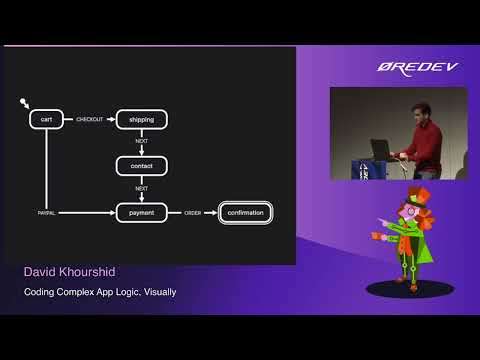
Watch on YouTube (Øredev Conference)
What is this talk about?
Session description: What if you could code without coding? As the number of features and requirements increase in our apps, text-based logic becomes much more complex to understand, change, and test. Using visual event-driven state modeling with state machines and statecharts orchestrates this logic in a simpler way. In this talk, you will learn about new tools and techniques for managing and edi (From the video description.)
“We're going to be talking about coding complex AppLogic visually, so we all know how to code app logic, and coding complex appLogic is something that gets, of course, a little bit more cumbersome.”
“By using something called a visual formalism, we could actually make it a lot easier to code this complex app logic.”
From the opening of the talk.
Key takeaways
- By using something called a visual formalism, we could actually make it a lot easier to code this complex app logic. 0:00
- At the very least, model your application logic using events instead of directly manipulating the states. 18:00
- One of my favorite is Dijkstra's shortest path algorithm, so because you're expressing your app logic as a directed graph. 23:00
- Instead of directly creating the state machine over here, we are, or, sorry, instead of working with the same machine over here, we're going to be creating a state machine. 31:00
- In general, whether you're coding, you know, just front end, back-end applications, no matter how much complexity there is. 39:00
Quoted from the transcript.
Full transcript
From YouTube auto-captions. Punctuation and capitals were restored automatically. Technical terms were normalized; some errors remain. 6,896 words.
0:00 Introduction
All right, hello everyone, I guess we could go ahead and get started. My name is David Khourshid, I'm at Stevie KPN. They're pretty much everywhere online. And I'm very excited to be, in Malmu. It's actually my second time in Malmu, and I was recently in Copenhagen, beautiful city, not as beautiful as Malmu. I don't know, I don't know if you get offended by that or anything, but anyway, uh. We're going to be talking about coding complex AppLogic visually, so we all know how to code app logic, and coding complex appLogic is something that gets, of course, a little bit more cumbersome. Harrier and I'm going to show you how. By using something called a visual formalism, we could actually make it a lot easier to code this complex app logic. But first of all, how does AppLogic get complex? So here's a very simple example, and this is in React, if you know React, then you're going to, you're going to probably find this example entertaining. And if you don't know reacts, then you're going to find this a lot more entertaining.
Just because you're going to be like, what the heck is going on? So, over here we have an on submit event and so when we're submitting the form, we're submitting the data. But as anyone who's filled to form those, this is not the entire story, right? We have to have some sort of indicator that we're actually loading the data, so we have to have some. IS loading states Boolean variable in there, and then we have to set IS loading to true. But you see the problem here. This loading spinner is going to keep going on and on because we're not turning it off. So we have to add a resolution to that promise, where when the promise is done, you know, we might set our data, we might do something with it. But we need to set that loading spinner to false, or that loading flags of false so that we don't see the loading spinner.
But then there's the other problem where we have to actually handle errors. So with errors, you know, now we have to set another variable and then we have to set the error when we get the error. But we also have to make sure that we're. Hiding the loading spinner and I've seen this happen a bunch of times where you still see the loading spinner, but you see an error or worse. You will see applications and, trust me, go ahead and play around with applications. You're going to see this happen in at least a few of them. Where you do something, it's loading and loading and loading, and you're like, Okay, are you done loading? This is a really big file. What's going on? So you're like, you know what? Let me take a peek inside the console and then you realize, Wow, there's actually a huge error and the UI decided not to tell me anything about it.
So these are all edge cases, or not even edge cases. These can be pretty easily run into by any normal user. And these are all things that you have to think about. But it gets even more complex than that. You know, we have to also think about cancellation, what if we want to cancel a promise, cancel fetching data? Now we have to handle that as well, otherwise we're going to be running into race conditions. So this is just one very, very simple example of code where things can get out of hand pretty quickly.
3:00 By definition, adding features doesn't necessarily remove complexity, in fact…
Now, this might just be one feature. Multiply this by however many features you have in your app. And you could see how complexity just grows even exponentially over time. And there's many reasons for this. There's the addition of features, the more features you add, the more complexity you're going to get. By definition, adding features doesn't necessarily remove complexity, in fact, that very rarely happens. There's also changes to features, and you're never sure whether, like changing a feature, is actually going to affect other features. Just because in your application, features are all interconnected. And of course, the more features you have and the more requirements you have, the more bugs you're going to have, so you have to also fix those bugs now. I would love to say that the best way to fix a bug is to delete code. But more often than not, when you fix bugs, you're actually adding code, or at the very least modifying code.
And then there's the issue of adding developers and developers leaving your team, whether you like it or not, there's a. Lot of institutional knowledge that lives only in the developer's head. So that when they leave the company, or when they switch teams are, when they work on something else. All of a sudden, that knowledge stays with them and it might be hard to get a hold of them. They might not always be available, and so you get complexity as a result. And then, of course, even if we didn't have any of those things, there's always us. You know, the nature of developers trying to chase shiny new things, you know, there's a new framework every week in the JavaScript landscape, and I'm not sure how it is in the back and landscape. I. I hope that there's not as much churn as the front-end landscape. But and if there is, I'll become a, or if there isn't, I'll become a back-end developer.
That sounds like fun, but one of the biggest problems that I've seen, or what like, I guess one of the biggest symptoms of this is that we write code, that's the number one way that we write our programs is by just writing code.
5:00 Really, code is more like one of those
And the way we write code, of course, is to be understood by other developers. Here's the problem. Though code is text, it's primarily text, and text you read in three ways, you read left to right, just like a book, top to bottom, in file by file. And this is especially true when you're reviewing PRS. Typically how I review PRS is I just go file by file, try to read it, and it doesn't really make sense. It's hard to piece together a picture of what the developer was thinking when they were writing all of that code. And so it occurred to me that code is linear, but programs are not necessarily linear. I mean, just, think about, you know, the earliest basic programs where you have all those go-to's. You would read it linearly until you see a go to, and then you would have to shift your eyes up to a line.
So, really, code is more like one of those. Choose your own adventure stories where you have a function call. Now you have to switch contexts in your brain and read that function and try to understand the context that function was called in when you're going back. To the original code that you were originally reading. So, yeah, here's one example from Slack. I'm not sure how many of you have seen this before, but this is a decision tree or a flow chart, whatever you want to call it for. When Slack decides to send a notification. And so this is just one small part of business logic that, you know, in Slack, and of course, Slack is a very complex program. I'm not sure whether this is on the front end, this is probably on the back end, I guess, or maybe the front end. But there's a lot of decisions to be made just for deciding whether not to show a notification or to show a notification.
And so you could see, this is something that's very hard to describe in a linear way. So that's why, you know. Spoiler alert having this in a visual format actually makes things a lot clearer than having it in a text-based format. But when we think about low code, we sort of think about things like this. How many of you remember this, right? This is how I started programming with. I was going to say, VS code, this is not VS code. This is visual basic. And so what was cool about visual basic is it allowed you to drag and drop certain things on the screen and then you could program each of those elements and you had a nice visual representation of what your program was going to look like, and you didn't need to write everything by code, a lot of the visual elements, again, could just be tracked and dropped on the screen.
But of course, right now we're sort of the opinion where when we look at low code, AS developers were like, maybe no thanks, maybe. I just want to stay with code because code gives me the most full flexibility. But in reality, U.S. developers. We do use low code in a way, and so we use low code no code to supplement the code that we're already creating. So two great examples are TL draw and Excalator. And, I'm sure a lot of you might be familiar with Excalibur. TL draw is another fantastic drawing tool that's just like Excalibur. And both of them are very helpful when you're creating architecture. Diagrams or simple flow charts, or things like that to easily draw and show your team, just diagrams for what you're trying to express. And of course, these can be related to the code, and it's very nice to see these diagrams alongside your documentation.
Or as a way of explaining the code that you have that you're working with. So, two extremely useful tools, I use them pretty much every day. And then we look at other industries, for example graphic design. There's tools like Procreates, there's video editing tools. Adobe has a whole Suite of tools, Photoshop, Illustrator, there's DaVinci, resolve, and so all of these tools are professional tools. These aren't simple tools where it's like, Oh, I just want to make a simple picture or create a simple video. When you get into really advanced editing, you're not given an IDE where you have to code everything, you're given a very detailed and advanced visual interface in which you could create these things. And it's not limited to just those, there's also game development and computer-assisted design. This is Unity blueprints, and this is AutoCAD, and of course, these are all visual tools that professionals use every day. And even with websites and apps, there's tools like, like Plasmic and Framer for web, and you know, there's Webflow too.
And all of these are visual tools that help us create applications. And they're not even just limited to, to novice developers or so-called citizen developers, but also to, just, you know, advanced developers could use these kinds of tools as well, uh. But of course, the vast majority of what we're working on today uses IDes such as VS code, or WebStorm or Notepad plus. Plus if some of you are still using that. But here is a core problem. When we're working with teams, we have code and we have other sources of truth, so code is not the only source of truth. We also have user stories and user flows in the form of diagrams and mock-ups from designers. And, of course, we also need to write tests which live separately from our code base for whatever reason. And then we have these tutorials, which sort of just fits in with documentation as well.
And the problem is that none of these are written in the same language.
11:00 Logged out when we log in with correct credentials…
We have a Tower of Babel situation in which all of these just sort of clash and nobody is talking the same language on the team. And so if we split the team into three types of personas, we see that each one of them has their own language or their own way of sort of talking about. Pretty much the same thing with designers. Again, you have mock-ups that you might make in Figma or user flows. Stakeholders might be writing in. Project managers might be writing user stories, requirements, specifications, tutorials as well, and developers. Of course, we're writing code and tests to implement all of the above, but again, these are at minimum, three completely different languages. So it's my goal today to just try to find that common language that all our entire team can use. And so when we talk about like a user story or a specification, I really like to use this kind of flow, these boxes and arrows.
So for example, we have this user story where given the user is logged out, when the user logs in with the correct credentials, then the user should be logged in. Now. Notice that with these boxes and arrows, we're basically saying this, and we're doing it in a visual way, you know? Logged out when we log in with correct credentials, the arrow points to logged in now. This could be useful for a project manager or a designer, but as a developer, you might need more detail. And so this is something where we could easily refine the diagram. To say, okay, as a developer, here's the things I care about, and as a designer or a project manager, or a stakeholder, I only care about the higher level. Things in these details don't really matter directly to me. And so you could do this for your entire application. So, yeah, in an application. You could think of as a series of just a lot of user stories all coming together, and so each one of these user stories might be a couple of those boxes in one of those arrows, or even more than one arrow.
13:00 We have the events and then we have the next state…
And so when you put all of that together, you realize that. They make a directed graph now, if you don't know what a directed graph is, it's just a graph where you. Have nodes, which in this case, those are all of the circles over there, and edges which connect each of the nodes. And the directed part means we are going in a specific direction from one node to one edge. So, for example, if you're logged out, that might be a node, and so if you click login, that might be an edge that goes to a logging in node. And then lather, rinse, repeat for your entire app, and then, if you zoom out, you're going to realize that your app is just a series of these. No notes and edges, all connected to each other. So, one of the best ways that I found, and I found this quite a few years ago to express. This is something called a state machine, and now a lot of you might be familiar with the same machine, but if you're not, then I'll just describe it to you real quick.
A steam machine is basically a directed graph where you have again all of these notes and edges, which are connected with these directed arrows. So seat machines have five parts, and this is their mathematical definition. They have an initial state, which is the state that the state machine always starts in. They also have a series of states, and these states are finite. So you could think of a state as representing the behavior. Or when I talk about behavior, I mean what can happen when it is provided in an event. So when the machine word sees an event, it's going to do something different, depending on which state it's in. And so these are the events, and so events can come from anywhere, events are things that happen. So, for example, check out, you could interpret as someone clicking a checkout button, and we're going to see an example of that pretty soon.
Clicking next, this could be a next button, or pressing the right arrow key on your keyboard. So these are all things that happen and transition you from one state's to another, and these transitions are depicted with these arrows over here. Showing that when I'm in the states and an event is received, I will immediately transition to another state. Or I might stay in the same state and maybe do something else, and, of course, state machines might also have final. States, and this is when the state machine is pretty much done and no other operations can occur. So I found state machines to be very useful. Not only for, you know, back-end workflows, but also for the front end. This is an example UI where, you know, we're just we have a password protected screen. And there's a bunch of different states that this could be in. And so, this is actually on CodePen.
I forgot to add the link over here, but this shows you how it's transitioning through all of the different states as we're trying. Different passwords. And you see, you know, it went to the success date now, uh. Some of the benefits of state machines are, well, first of all, they prevent impossible states, and you might think that impossible states, you know, rarely happen. But again, play around with apps. You're going to see, you know, things like the loading spinner still occurring, when you see an error, or you know, things like that. So just things that don't make sense and so impossible. States might be a nuisance at best, but they could entirely break the app and the experience for the user at worst. And so if you take anything from this talk, especially if you're like, you know what? I don't want to use steep machines, I don't want to use X data or any of these fancy libraries, then please just take this. When you have Boolean variables such as IS loading, is, success has errors, things like that, and they're actually all mutually exclusive.
Please consider using an enum value instead, and so, even if you're not using a type system. This could be something as simple as assigning a string instead of a boom million value. Because strings contain a lot more information in context than each of the Boolean variables you have. You know, true or false, that's it, but when you have an enum now, it's impossible to be in, like, more than one of these states. But over here, if it's loading is true and is success is true. You know, that's an impossible state, and you can't have that over here. So how do we make state machines? The truth is, you don't actually need a library to make these state machines, you could use a. Simple switch statement and so many of you, if you've used Redux or something similar, you might have done this before. However, there's one big difference.
And the difference is that we're not switching on the events, but instead we're switching on the state's value instead. And so the state value could be that. You know, loading error, success. And then we determine what to do based on the events that we receive. So it's sort of a switch in thinking, we're not going event first, we're going states first. But again, another thing that if you took one thing or now two things from this talk is that. At the very least, model your application logic using events instead of directly manipulating the states. By doing it in this way, we're sort of training ourselves that, events are important. And everything that could happen in the app can be in events that's dispatched. And it makes your application logic a lot clearer to understand as well. And it also makes it a lot more flexible. Because now, for example, pressing the enter button or clicking a button, those could both send the same events.
And again, we'll see an example of that soon. Another way that I like to make steam machines is using objects, and that's because I don't really like writing switch statements, so with Optics, it's actually pretty convenient. Because I could just put it in this special data structure. Where I have all of my states in the state object, and then all of my transitions in each of the states in this on object. Where I. I could add multiple events here if I want. But we have the events and then we have the next state where it should be in. And then once you've done that, it's just an object lookup. So we're taking the current state, which, for example, might be might be cart, and then we're looking up the state objects of states carts. And then we're looking up what the what the event is and what the transition is going to be.
So we look at on events type and so in this case, it's checkout and so we know what the next events is going to be. And so again, this is without using any libraries. You could use this today. And it's just a really. Great way of containing your logic in a state machine in a very, very simple way. Now, of course, uh. There's also libraries for seat machines, and the one that I'm going to talk about is called XState. So I created this library about six or seven years ago, and the purpose of it is to allow you to create steam machines and statecharts in JavaScript. And eventually we're going to be working on other languages as well. But with XState, if you notice, it's pretty much that exact same object structure, so it's just taking that and it's wrapping that in. This create machine function, and then we have an interpret function that actually takes that machine and makes it alive.
It creates an instance of that machine called an actor. That we could send events to, and we could subscribe to it so that we could know when the state changes. Now, it does a lot more things than this. And again, we're going to be looking at a couple of demos pretty soon. But, yeah, this is pretty much it. So, yeah, I encourage you to, you know, just check out X8 and we'll take a look at the demo soon.
21:00 If I click check out over here…
So, one of the great things about state machines is that you could identify logical flaws, and these logical flaws might be things that your IDE or your language server might not even detect. So, for example, and this is a logical flaws that are pretty much at the business logic level, not necessarily at the code level. So while, for example, this state machine might look perfectly fine, you might have a project manager or designer look at it and say, hey, we're missing a few arrows, for example, we might be missing a back arrow for the contact page or the payment page. And you could say as a user, I should be able to go back, or from the payment page.
I should be able to cancel, and when I cancel my payment, it should take me back to the cart screen. And so this is an example. I've heard many stories where people would take the steam machines that they created. Show other people on their team who aren't developers, and they are the ones who are able to say, Hey, we're missing this or this. Arrow is pointing to the wrong place, so it becomes again a low no code way of expressing your application logic, and also speaking of expressing application logic. You could map your state machine to stories, to these user stories, and the other way around, for example, this transition over here could map to the user story as a user. When I'm in the carts and I click checkout, I should be taken to the shipping page and then we could have another story. Where as a user. When I'm in the carts. And I check out via Paypal, since PayPal has all of my information, I should be taken to the payment page.
If you're not familiar, PayPal is a payment processor. It's a European thing too, I think it's International anyway, I'm not sure what you all use. So um. Also, there's a lot of really, really cool things that you could do with directed graphs, and I'm really excited to show you this actually. But algorithms, lots of graph algorithms. One of my favorite is Dijkstra's shortest path algorithm, so because you're expressing your app logic as a directed graph. Now, you could say, Hey, find me the shortest path. That takes me from the initial states to the final state, which is the confirmation screen, and then it could say, Okay, the shortest path is through. Here. You go to the cart, you click PayPal, you're taken to the payment screen, and then once you click order now, you're on the confirmation page. Or you could tweak that a little bit, where you could say, find me the shortest path, where my shipping address is provided, and obviously we're not providing the shipping address through PayPal.
So the algorithm is going to Traverse all of the edges and determine that. Hey, we need to go through here and we need to go through that shipping state in order to, to have that shipping address provided. And so it's going to find a different shortest path, and then you could tie this to analytics or things like that. And especially as you grow your application. The shortest path algorithm just works really well for determining all of these different paths throughout your application. And then you could use that for generating documentation or generating tests. And that's exactly what I'm going to show you. Right now, so, we're close enough to Denmark. And I made this little Lego checkout app. We're actually not really close to Bill, and it's a few hours away. But I was really inspired by, you know, the Lego checkout page. Especially because they use XState. So I'm gonna I made a little demo of that over here and just to show you how it works.
If I click checkout securely, I could choose a shipping address, choose the shipping method. You know, enter some information, click payment, and then once I click agree. I could place my order and then I'm taken to the confirmation page. Or, much simpler, I could just click pay via PayPal. And since it has all my information, I could just place the order and then I'm taken to the confirmation page. So how does this app logic work? It works by using a machine, so a state machine. I'm going to show you exactly what that looks like over here, so this machine has all of the states in it. So we have cart, we have shipping contact, payment and confirmation, and so the transitions are over here. So when I select the shipping address, we're not changing states, we're just assigning that shipping address, and when we select a shipping method, you know, we do the same thing.
But once we click next, we go to the next state. So in this case, we're going to the contact page, but only if we have a valid shipping address. Now, this is a big JSON object, so it might be easier for us to actually, you know, visualize that. So I'll show you how that's done over here. If I go to the right page, okay, index..js. Because we wrote this as a state machine, we could visualize it as a state machine. And so there's this inspect utility from XState inspect, where once I press save over here, it's going to open this machine. And not sure if you could see that very well, but this is the state machine visualized over here. So, you know, we have the carts, we have shipping, contact payments and confirmation, and we see that once, like, if we go through PayPal, we're taken directly to the payment screen. Now, what's cool about this is this visual this visualizer is.
Actually directly connected to the app. So if I click check out over here, it's actually going to take me to the shipping address and then I could choose a shipping address. Continue to contact information. And it's going to change the state over here so you could actually see it happen in real time. But I did talk about, I'm going to just hide this for a minute, because I did talk about another thing. And that's the generation of things like documentation and tests. Again, we talked about how we could use shortest path algorithms to generate all of these paths through the app. And so what I'm going to do is I have this fine scenario function where we have a whole bunch of checkout scenarios. Generated from that state machine, and I'm going to find the confirmed scenario where the state matches confirmation. And so from that, I'm going to generate two things.
I'm going to generate the steps that go through the machine and determine what is the shortest path to get to the confirmation. And I'm also because this is a React app and you can do this with anything Reacts, views, Felts Angular. I'm going to automatically generate all of the views in order to get to each of those steps. So now that I did that, we see that we have auto generated steps on the shopping cart, paid via PayPal on the payments. Agree to the terms and conditions and then place your order and then you will reach order confirmed. Now this is coming from the machine. Over here. I have a bunch of meta information, so like this shipping address, and so for each of the events, I have a description where it's select a shipping address. All of this lives inside the code, so I'm not having to maintain a separate file or a separate documents to automatically generate these steps.
Now, let's say that I didn't want to generate just the PayPal scenario, because I actually wanted to find the scenario. Where we actually do. Provide a shipping address, so I'm going to do and scenario.state.contacts.shipping address so basically we're checking, do we also have a shipping address? So hopefully, if I save this, it will automatically generate all of those steps that take me through that state machine and generate each one of.
29:00 When the video ends, then we need to go back to…
These steps, and also each one of the views over here, so it's simulating what's actually happening when the user goes through the entire flow. So, yeah, that's an example of using a state machine to generate documentation and things like that. But state machines are not perfect, and I, I'll be the first to admit that one of the biggest problems with state machines is called state and transition explosion. And that's when you have more and more states and more and more transitions, and since a lot of these can connect to others, you have a combinatorial explosion of these states and transitions. And it could be a little unwieldy and start to look like this spaghetti soup over here and hard to visualize. And so that's why there's a formalism called statecharts, which extends the notion of steep machines and provides a lot of other features. So one of the features it provides is this notion of actions or these effects that you could attach to transitions, and so these are transition actions. But you could also simplify these by putting them inside of the states and saying, whenever I enter the state, we're going to fetch data, whenever I exit, we're going to log telemetry.
And so all of these action are part of the formalism of statecharts, and so some other important things. There's compound states where you could nest states inside of a parent state. So when I transitioned to the ready states, we're in the playing state, and then when, when I transition out, then, you know, we're in the loading states. Um. And so you could transition between these playing and pause dates once you're in the parent states. There's also parallel states, which allow you to specify different regions or responsibilities within your app. So if I have a music player, I might have two responsibilities, which is the player itself, whether it's playing or paused, and the volume, whether it's muted or unmuted. And so there's a ton of other features like guarded transitions, the ability to raise events or send events to self delayed transitions, event list transitions where a transition is immediately taken.
History, states, and a lot more. And so, I have a quick one more demo for you. And so with this, we're going to be going the other way, so. Instead of directly creating the state machine over here, we are, or, sorry, instead of working with the same machine over here, we're going to be creating a state machine. And this is going to be a much simpler app, but you're going to see still how state machines are useful in this app. What I want to do is when I click this video, I want it to open up full screen and start playing. And then when I exit the video, and there's a number of ways I could exit it. I want it to stop playing, but also once the video stops, I want it to stop playing. Or and go back to the mini mode after a few seconds. So let's go ahead and model this right now.
So I, right now, this is actually Stately..ai editor, which is, in a, a free editor for state machines. And so I have this mini state over here, I'm going to create a full state over here. And so this is when the video player is full, so, I'm just going to say full screen video player and just have that over here. And so this is going to be toggled when. Let's just make a toggle event so I could toggle back and forth between mini and full salt, just put toggle over here. But there's a couple of other events that could happen. That causes me to go back to the mini state, so, for example, I'll just move this up here. When the video ends, then we need to go back to the mini state. And also when the Escape key is pressed, so I have this essay in Escape key event over here now. In order to get these events, we also have to invoke some listeners basically, or actors, in other words.
So what I'm going to do is I'm going to just add these. So we're going to be listening for the video ended event and we're also going to be listening for the key Escape events. And so these are going to be things that just while we're in this dates, it's going to be listening for the video ending events and the key Escape events. And at the same time, we also want to play and pause the video, too, so when we enter this. Full screen state, we want to play the video, and when we exit, we want to pause the video. Okay, so I think that looks pretty good, except we were talking about statecharts. So what I'm going to do is also add a couple of child states, so this is going to be playing and we also want to have some sort of delay when the video is stopped. So now, instead of this video ended event being here, we actually want that video ended events to be right over here.
So that we could wait a couple seconds before we go back to the mini state. So I'm going to just make this an after transition, so we're going to say after and let's set it to two seconds, so 2 000 milliseconds. All right now, let's actually make sure that this logic works. I'm going to click simulate over here. And so we could, you know, play pretend with our live diagram that we made. And let's toggle back and forth. Once we toggle, we're going back between the mini and the full screen, and also when we're in the full screen. We could, of course, press the Escape key, which should take us back to the Mini screen. But if we're watching the video and the video ends, then after two seconds we should transition back to the Mini screen. Okay, so now that we have our diagram in place, let's go ahead and start coding it.
And to do that, all I'm going to do is export the code because I don't have that much time. So we're just going to copy all of this to the clipboard and then I'm going to put this in our machine over here and hopefully it works all right. So now I have my logic and I've already attached event listeners and things like that. So if I click here not working, let's see. Oh, I, it literally says David. Don't forget this. So, oops, there we go. So now we're adding an event listener to the to the click. And so now, when I click and I toggle out, it's going to close the video. Also, when I press the Escape key, it closes it, and when I allow the video to end, hopefully after two seconds, one, two, it goes back to many. So there you go.
And so that's just one example of how visual programming can actually be really helpful. Because we're not only making it easier to, to express application logic and to create it, but we're making it easier for other people on the team to understand it, and by other people, I don't just mean non-developers, I mean the rest of the developers on your team. Because the way that we typically code is, we put logic and event handlers and callbacks, and just some ad hoc logic floating around everywhere. And so, with the rise of Redux and Flux and these types of events driven Frameworks, we've begun to be a little bit smarter. And put all of these in reducers instead, where events might change some data within the reducer.
37:00 One of the best ways I have of describing, like…
State machines take that a little bit further, and instead, they separate this data into different states. And they give you a more structured way of organizing the different states and transitions that comprise your application. Logic. And, of course, statecharts take that even further, allowing you to describe declarative effects to NESt states, to make them parallel and to handle a lot more than normal state machines. And then we could get even further, so, we could. Like. One statechart describes the behavior of a single entity, but we could have a lot of entities talking to each other. And these are called actors now. Actors are things that could send and receive events. And we don't have too much time to go into this right now. But an actor model, if you've been working in the front end, you might not be familiar, but in the back end, with microservices and things like that.
The actor model is actually really prevalent. There's a lot of rules that actors may have, where it's basically entities sending and receiving events to each other. And so one of the best ways I have of describing, like, what an actor is like ordering a coffee, you have two different actors the barista and the person who's ordering a coffee. And in order for that transaction to take place, they actually have to talk to each other. So this idea of message passing extends beyond just normal human communication. It's actually a really good way of expressing how different parts of your code. Your applications, your microservices, every part of your code base, can talk to each other. And so that's why I think having things in an events driven way is really good. Because by using events, you have these arrows which can visually describe just how everything interacts with each other.
And you know, besides state machines and statecharts, you also have, you know, actor system architectures and sequence diagrams. And these allow you to really take the requirements that you're given by designers and project managers. And a code in a simple, visual way, and make it really easy to express your application logic. So in general, whether you're coding, you know, just front end, back-end applications, no matter how much complexity there is. Using these visual diagrams can really help you simplify the application logic and make it so that your entire team can understand it. And that's why I think the future of development is visual. So with that, thank you very much. Or that?
Related talks
-
Modeling Application Logic Visually
Certified Fresh Events, 2022. 42:23 -
Modeling Application Logic Visually (Extended Session)
Certified Fresh Events, 2022. 47:13 -
Reactive State Machines and Statecharts
Uphill Conf 2019. 21:25, 2.9K views -
Making Application Logic Visually Collaborative (Infobip Shift)
Infobip Shift 2021. 27:18